
Most websites are making SEO mistakes right now without even knowing it. You could have great products, strong content, and a clean design — but if these errors exist on your site, Google will keep pushing you down in search results. This guide covers all 20 of the most damaging SEO mistakes, explains why each one hurts your rankings, and gives you a clear fix for every single one. No technical jargon. No complicated steps. Just practical advice you can use today.
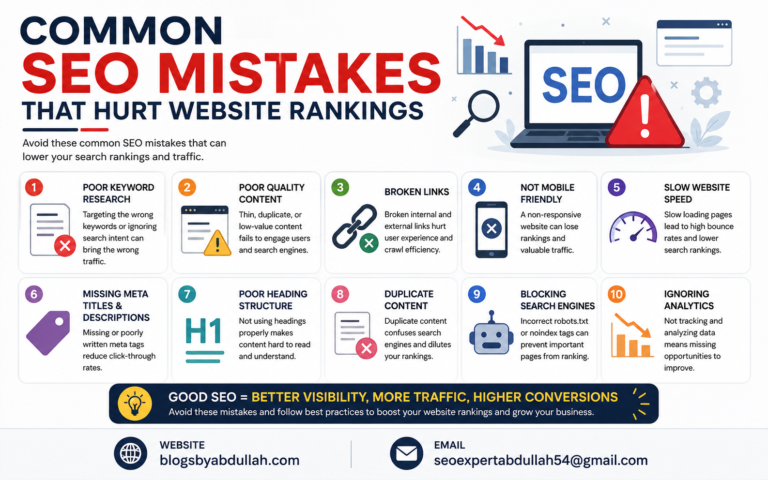
Many websites fail to rank on Google because of common SEO mistakes that reduce visibility and traffic. Poor keyword research can target the wrong audience and lower search performance. Slow website speed creates a bad user experience and increases bounce rates.
Duplicate or low-quality content confuses search engines and weakens rankings. Missing meta titles and descriptions can reduce click-through rates from search results. Broken links and poor website structure make it difficult for search engines to crawl pages. Ignoring mobile optimization can lead to lower rankings on smartphones and tablets. Regular SEO audits and proper optimization help improve rankings, traffic, and online growth.

Keyword strategy is the foundation of SEO. If you target the wrong keywords, everything else you do will not produce results. These are the most common keyword mistakes that silently destroy your chances of ranking.
Every keyword has an intent behind it. Someone searching “best running shoes” wants to buy. Someone searching “how do running shoes work” wants to learn. If your page sells shoes but ranks for an informational keyword, Google will eventually push it down because it does not match what the user expects. This is one of the most common and most overlooked mistakes. Many websites spend months optimizing for keywords that will never convert because the intent does not match the page. Fix: Search your target keyword on Google. Look at the top 5 results. If they are all blog posts and your page is a product page, you have an intent mismatch. Change either the keyword or the page type.
Many website owners go after short, popular keywords with millions of searches per month. These keywords are almost impossible to rank for when you are starting out. Long-tail keywords like “best SEO tools for small business 2025” have lower search volume but much higher conversion rates and far less competition. Semantic keywords are related terms and phrases that Google expects to see in content about a given topic. If you write about “coffee brewing” but never mention words like espresso, grind size, or water temperature, Google may not see your page as truly relevant. Fix: Use Google’s own “People Also Ask” boxes and “Related Searches” at the bottom of any results page. These are free keyword research tools built into Google. Build your content around these related topics, not just one keyword.
Keyword cannibalization happens when two or more pages on your own website compete for the same keyword. Google gets confused about which page to rank and often ends up ranking neither one well. This is a mistake most websites never catch — yet it affects thousands of sites. For example, if you have a blog post called “Best SEO Tips” and a services page that also targets “SEO Tips,” these two pages are fighting each other for the same search query. Both pages lose as a result.
Go to Google and type: site:yourwebsite.com keyword. If multiple pages show up for the same keyword, you have cannibalization. Fix it by merging the weaker page into the stronger one, adding a canonical tag, or changing the focus keyword of one page.
On-page SEO is everything you control directly on each page. These mistakes are common, easy to miss, and have a large impact on how Google reads and ranks your content.
Your title tag is the blue clickable link people see in Google search results. Your meta description is the short text below it. If these are weak, duplicated across pages, or missing keywords, two things happen: Google does not understand what your page is about, and users do not click on your result. Many websites use the same title tag on multiple pages, or use vague titles like “Home” and “Services.” This is a basic but costly mistake. Fix: Write a unique title tag for every page. Keep it under 60 characters. Include the main keyword near the beginning. Write meta descriptions that clearly explain what the page offers in under 155 characters. Every page needs its own unique description.
Headings are not just for design. Google reads them to understand your content structure. A page with only one giant block of text and no headings is difficult for both readers and search engines to process. A page where headings are used randomly sends confusing signals. Each page should have exactly one H1 tag that contains the main keyword. H2 tags should break the content into major sections. H3 tags go inside those sections for sub-topics. Fix: Review every important page on your site. Make sure each page has one H1 with the main keyword. Use H2s and H3s to create a logical outline. Think of your headings as a table of contents for your page.
Google’s Helpful Content Update made one thing very clear: content that exists just to fill space or chase keywords will be penalized. Pages with fewer than 300 words on complex topics, content copied from other websites, or articles that do not actually answer the user’s question all fall into this category.With AI tools making content creation easier, many websites now publish large volumes of hollow content. Google is actively downgrading these sites in favor of content that shows real experience and genuine usefulness.
Instead of deleting thin pages, expand them. Add real examples, data, step-by-step instructions, and your own perspective. A 400-word page that gets expanded to 1,200 words with useful detail often sees a significant ranking improvement within weeks of Google recrawling it.
Images are often the most neglected part of on-page SEO. Every image without an alt text tag is an invisible asset. Google cannot see images — it reads the alt text to understand what an image shows. Missing alt text means you lose ranking opportunities in Google Image Search and the main results. Large image file sizes also slow your page down significantly. A single uncompressed image can add 2 to 3 seconds to your page load time, which directly hurts your rankings. Fix: Add descriptive alt text to every image. Compress all images before uploading using a free tool like TinyPNG or Squoosh. Use WebP format instead of JPEG or PNG where possible — it is smaller and faster. Name your image files with relevant keywords instead of leaving them as IMG001.jpg.
A URL like yoursite.com/p=12?ref=social tells Google nothing useful. A URL like yoursite.com/seo-mistakes tells Google exactly what the page is about. Clean keyword-rich URLs are a consistent ranking factor. Messy URLs also hurt user trust — people hesitate to click on links they cannot read. Fix: Keep URLs short and descriptive. Use hyphens between words, not underscores. Remove stop words like “and,” “the,” and “a” from URLs. Never use numbers or random characters in URLs for content pages.
Technical SEO is the infrastructure of your website. These mistakes are often invisible to the human eye but Google sees every one of them. Fixing technical errors can produce fast and significant ranking improvements.

Core Web Vitals are three specific performance metrics that Google uses as a ranking factor. Most people have heard of page speed, but very few know the three actual measurements Google uses. LCP stands for Largest Contentful Paint. It measures how quickly the main content of your page loads. Google wants this under 2.5 seconds. INP stands for Interaction to Next Paint. It measures how fast your page responds when someone clicks something. Good scores are under 200 milliseconds. CLS stands for Cumulative Layout Shift. It measures how much your page elements move around while loading. Nothing is more frustrating — or more penalized — than a page where buttons and text jump around.
Go to PageSpeed Insights at pagespeed.web.dev and enter your URL. The tool will show your LCP, INP, and CLS scores along with specific recommendations. Common fixes include compressing images, reducing unused JavaScript, setting explicit size attributes on images and videos, and upgrading your hosting if server response time is slow.
A technical SEO audit checks your website for errors that prevent Google from crawling and indexing your pages. Broken links, crawl errors, redirect chains, pages blocked by robots.txt, and missing XML sitemaps all fall into this category. Many websites have dozens of these errors and do not know it. A page that Google cannot crawl is a page that cannot rank. It does not matter how good the content is. Fix: Set up Google Search Console for free at search.google.com/search-console. It will show you crawl errors, indexing issues, and which pages are blocked. Run a free crawl with Screaming Frog SEO Spider to find broken links, missing meta tags, and duplicate content. Do this audit at least once every three months.
Google now uses the mobile version of your website as the primary version for ranking. This means if your desktop site looks great but your mobile site is slow, broken, or missing content, your rankings will suffer across all devices — including desktop. More than 60 percent of all Google searches now happen on mobile devices. A website that is not fully optimized for mobile is losing the majority of potential visitors. Fix: Test your website at search.google.com/test/mobile-friendly. Ensure all content visible on desktop is also visible on mobile. Remove pop-ups that block content on mobile screens. Make sure buttons are large enough to tap easily and text is readable without zooming.
Schema markup is a type of code you add to your pages that tells Google extra information about your content. It is what makes rich results appear in Google — stars from reviews, FAQs that expand directly in search results, recipe information, event dates, and more. Without schema markup, your listing in Google looks plain. With it, your listing can take up significantly more space and attract far more clicks. Fix: Add FAQ schema to any page with questions and answers. Add Article schema to all blog posts with your author name and publication date. Add LocalBusiness schema to your homepage if you serve local customers. Use Google’s Rich Results Test tool to check your schema is working correctly.
Off-page SEO is about how the rest of the internet sees your website. These mistakes affect your domain authority and the trust signals Google uses to decide how much to rank your content.
Backlinks from other websites are one of the strongest ranking signals in SEO. A link from a trusted relevant website tells Google that your content is valuable. But a link from a low-quality spam site tells Google the opposite — and can actively hurt your rankings. Many businesses buy cheap backlink packages that promise hundreds of links for a small fee. These links almost always come from spam sites, private blog networks, or unrelated directories. Google’s algorithms can detect these patterns and apply penalties that can take months to recover from. Fix: Focus on earning links through quality content, guest posting on reputable sites, and building relationships with others in your industry. Use Google’s free Disavow Tool in Search Console to tell Google to ignore any toxic links already pointing to your site. Check your backlink profile regularly using Ahrefs or SEMrush.
Internal links connect your pages to each other. They help Google understand the structure of your website and pass ranking authority from strong pages to weaker ones. Websites that have orphan pages — pages with no internal links pointing to them — are essentially hiding those pages from Google. Using vague anchor text like “click here” or “read more” is also a missed opportunity. Descriptive anchor text like “complete guide to technical SEO” tells Google exactly what the linked page is about. Fix: Make sure every important page on your website has at least two or three internal links pointing to it. Use descriptive anchor text that includes relevant keywords. Create topic clusters by linking related articles and pages together. Avoid having important pages that are only reachable through your menu.
E-E-A-T stands for Experience, Expertise, Authoritativeness, and Trustworthiness. Google uses these four factors to evaluate whether your content is trustworthy enough to recommend to users. This is especially important for websites covering health, finance, legal topics, or any subject where wrong information could harm someone. Websites with no author bios, no About page, no credentials listed, and no contact information score poorly on E-E-A-T. Google’s quality raters actively look for these signals when evaluating sites.
Every page should have a named author. Authors should have bio pages showing their qualifications and experience. Your About page should clearly explain who runs the website and why they are qualified to cover the topic. Cite reputable external sources when making factual claims. Display trust signals like awards, certifications, media mentions, and client reviews.
These mistakes are about how you plan, create, and maintain your content over time. They are slower to damage your rankings but just as serious as technical errors.
Content decay is real. A well-ranked article can slowly drop from position 3 to position 15 over 12 to 18 months simply because it was never updated. Google rewards freshness, especially for topics where information changes. Statistics, tool recommendations, best practices, and how-to instructions all go out of date. Many websites publish content and then move on without ever looking at it again. This is one of the biggest long-term ranking mistakes you can make. Fix: Schedule a content review every six months. Check your top 20 ranking pages in Google Search Console. For any page that has dropped in ranking over the past three months, update it with new information, recent statistics, and current examples. Add a clearly visible “Last Updated” date to the page.
Publishing an article does not mean people will find it. New content gets very little traffic from Google for the first three to six months while it builds authority. During that time, your content needs to be discovered through other channels. Many website owners publish and wait, then wonder why nothing ranks. Fix: Every time you publish a new piece of content, promote it through at least three channels. Share it on your social media pages. Send it to your email list. Reach out to other websites in your niche who might want to link to it. Repurpose it into a short video or social post. Content that gets early traffic and engagement ranks faster.
This section covers mistakes that are new to 2025. Google has fundamentally changed how search works with AI Overviews appearing at the top of many results pages. These are mistakes that most SEO articles are still not talking about.
Google AI Overviews are the AI-generated summaries that now appear at the top of many search results pages. They pull information from multiple websites and present it directly in the search results, reducing clicks to individual pages. If your content is not structured in a way that AI systems can easily extract and cite, you are missing a major visibility opportunity. Websites that get cited in AI Overviews often see large increases in brand awareness even when direct clicks do not increase. Being the source Google’s AI references is a new form of ranking. Fix: Structure your content with clear direct answers to specific questions. Use short definitive sentences when explaining concepts. Add FAQ sections to your pages. Use schema markup. Write content that directly answers questions rather than dancing around them. This makes your content easier for AI systems to extract and cite.
If you are not measuring your SEO performance, you cannot improve it. Many website owners check their Google Analytics occasionally but do not track the specific metrics that matter for SEO: organic keyword rankings, click-through rates from Google Search, crawl coverage, and Core Web Vitals scores. Fix: Set up Google Search Console and check it monthly. Track your top 20 keywords using a tool like SERPWatcher, Ahrefs, or the free Ubersuggest. Set up Google Analytics 4 and create a simple organic traffic report you review every week. If a page that was ranking drops suddenly, investigate immediately — the sooner you act, the faster you recover.
If your business serves a specific area — a city, a region, or a country — local SEO mistakes can be costing you the most valuable customers. Google Business Profile errors, inconsistent business name and address information across the internet, and missing location-specific pages on your website all hurt local rankings. A business with an unclaimed or incomplete Google Business Profile is essentially invisible to anyone searching for services near them. Yet millions of small businesses never optimize this free and powerful tool. Fix: Claim and fully complete your Google Business Profile at business.google.com. Use your exact business name, address, and phone number consistently across your website, social media, and all online directories. Create a dedicated page on your website for each location you serve. Ask satisfied customers to leave Google reviews — these directly influence local rankings.
Knowing the mistakes is only useful if you can find them on your own website. Here is a simple three-phase audit you can complete in under two hours using mostly free tools.
First, fix indexing and crawl errors in Google Search Console. Pages that cannot be crawled cannot rank. Second, fix Core Web Vitals failures — these affect every visitor to your site. Third, fix missing and duplicate title tags and meta descriptions on your most important pages. Fourth, fix thin content on your highest-traffic pages by expanding and improving them. Fifth, address keyword cannibalization if you find it. Sixth, add schema markup to key pages. Seventh, work on your E-E-A-T signals and content freshness.
After making fixes, give Google time to recrawl your website. Most technical fixes show results within 2 to 4 weeks. Content improvements typically take 4 to 8 weeks to reflect in rankings. Local SEO improvements can take 4 to 12 weeks to show in Google Maps results.Check Google Search Console weekly after making changes. Monitor the pages you fixed and look for improvements in average position, impressions, and click-through rate. Document what you changed and when, so you can connect your actions to results.
The most common beginner mistakes are targeting keywords without checking search intent, skipping Google Search Console setup, writing thin content under 500 words, ignoring title tags and meta descriptions, and not adding alt text to images. These are all fixable and none of them require technical knowledge.
It depends on the type of mistake. Technical fixes like resolving crawl errors and improving page speed can show results in as little as 1 to 2 weeks once Google recrawls your site. On-page content improvements typically take 4 to 8 weeks. Recovering from backlink penalties or rebuilding E-E-A-T trust can take 3 to 6 months.
Most SEO mistakes result in lower rankings, not outright penalties. However, black-hat tactics like buying spammy backlinks, keyword stuffing, and cloaking can trigger manual penalties from Google's spam team. A manual penalty is serious and can remove your pages from search results entirely. Always follow Google's guidelines and focus on creating genuinely useful content.
Yes, absolutely. Google's algorithms are sophisticated enough to detect when keywords appear at an unnatural frequency. Keyword stuffing makes content unreadable for humans and signals to Google that you are trying to manipulate rankings. It actively hurts rankings today. Use your target keyword naturally and focus on semantic variations and related phrases instead.
Targeting keywords without understanding search intent. You can do everything else right — great technical SEO, strong backlinks, fast page speed — but if your page content does not match what users actually expect when they search that keyword, Google will not rank it. Always start with intent before building any content.
The best format is the one that matches the search intent for your specific keyword. Check the SERP for your target keyword and match the dominant content type you see. A format mismatch is one of the most common reasons otherwise good content fails to rank.
SEO mistakes are not permanent. Every single mistake covered in this guide is fixable. The difference between websites that rank on page one and websites that get no traffic is usually not talent or resources — it is attention to the details that most people ignore. Start with the mistakes that will have the fastest impact: fix your crawl errors in Google Search Console, compress your images, write unique title tags for every page, and check your Core Web Vitals. Then work through the rest of this list systematically. SEO is not something you do once. It is an ongoing process of fixing, improving, and adapting as Google evolves. The websites that stay on top are the ones that keep auditing, keep improving, and never stop paying attention. If you are not sure where to start, run a free audit using the tools in the audit section above. Look at your Google Search Console data first. The problems that need fixing are usually already there, waiting to be found.