
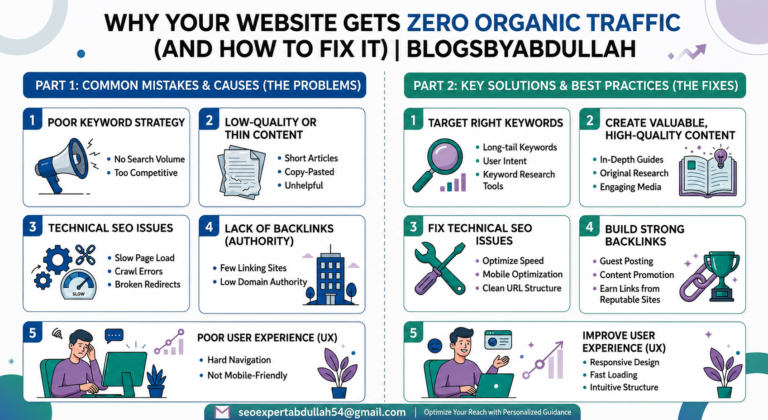
Your website may look great, but without proper SEO, it can remain invisible on search engines. Many businesses struggle to attract visitors because they target the wrong keywords, publish low-quality content, or ignore technical SEO issues. Slow loading speed, poor mobile optimization, and weak backlinks can also damage rankings. The good news is that these problems can be fixed with the right strategy. By improving your content, optimizing your website structure, and focusing on user experience, you can increase visibility and attract real organic traffic. Strong SEO practices help your website grow steadily and reach the right audience over time.
Organic traffic is the key to long-term website growth. By using smart SEO strategies, high-quality content, and proper keyword optimization, your website can attract real visitors without relying on paid ads. Build trust, increase visibility, and turn your traffic into loyal customers with a strong organic growth strategy.
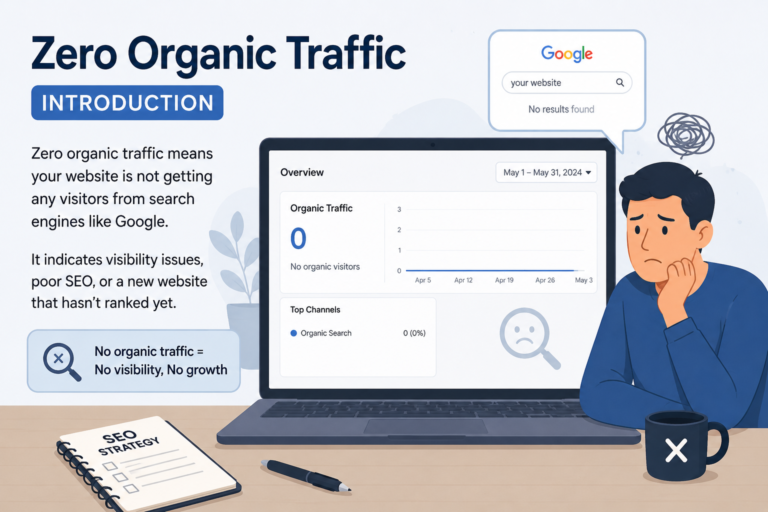
One day your website is getting visits. The next day the numbers fall. This is one of the most stressful things a website owner or SEO can face. And the worst part is not knowing why it happened.
The truth is that traffic drops have many causes. Some are technical. Some are related to content. Some are because of Google updates. And some are because of newer things like AI Overviews and tools like ChatGPT that are changing how people search online.
This guide will help you find the exact reason your traffic dropped and then fix it step by step. We will also cover the gaps that most articles miss including recovery timelines, content decay, AI traffic loss, and internal linking.
Let us start from the beginning.
Before you take any action, make sure the traffic drop is actually happening. Many times people panic because of a reporting error and not a real drop. Checking your data properly before doing anything else will save you a lot of wasted time.
Open GA4 and go to Reports then Acquisition then User Acquisition. Look at the Organic Search channel. Make sure you have not applied any filters by mistake. GA4 filters can hide traffic and make it look like your site has no visitors when it actually does.
Compare the current date range with the same period last year. This is called a year over year comparison and it is the most accurate way to see if something is genuinely wrong.
Open Google Search Console and look at the Performance report. Check your total clicks and impressions over the last three months. Make sure you have removed any filters on queries or pages that might be hiding data.
If both GA4 and GSC show a drop at the same time, the drop is real and you should move to the next steps.
Some businesses naturally get less traffic at certain times of year. A travel website gets less traffic in winter. A tax service gets less traffic in summer.
Go to Google Trends and type in your main keyword. See if search interest goes down every year at this same time. If it does, your drop is seasonal and not a cause for panic. Just compare year over year and you will see the pattern clearly.
If the drop does not match a seasonal pattern then something else is causing it and you need to investigate further.
A sudden drop means traffic fell significantly within a few days. This is usually the easiest type of drop to diagnose because it has a clear starting point. Here are the most common reasons this happens.
Google updates its algorithm many times a year. Some updates are small. Others like Core Updates and Helpful Content Updates can remove large amounts of traffic from sites overnight.
To check this, go to a site like Moz Algorithm History or the Semrush Sensor. See if any update was released around the same time your traffic dropped. If yes, your site was likely affected by that update.
Read the details of that update and understand what it targets. Core updates usually reward sites with strong expertise and trustworthy content. Helpful Content updates penalize sites that write content for search engines instead of real people. Knowing which update hit you tells you exactly what to fix.
A manual penalty happens when a Google reviewer looks at your site and decides it violates their guidelines. This is less common than algorithm updates but it is very serious because it can remove your site from search results almost completely.
To check for a manual penalty, open Google Search Console and go to Security and Manual Actions. If you see a message there, you have been penalized. You will need to fix the issue that caused it and then submit a reconsideration request to Google.
Common reasons for manual penalties include buying links, using hidden text, or having thin content across many pages.
If you recently updated your website, migrated to a new domain, changed URLs, or switched hosting, something may have broken during that process.Common mistakes include accidentally setting pages to noindex, blocking search engines in robots.txt, or removing important pages without proper redirects.Check your robots.txt file by going to yourwebsite dot com slash robots.txt in a browser. Make sure it is not blocking Google from crawling your site. Also check the GSC Coverage report for any increase in noindex or error pages.
Even if your site is live, Google might not be indexing your pages. This means your content simply does not appear in search results at all no matter how good it is.To check this, open a browser and type site: followed by your website address in Google search. If no pages appear, your site is not indexed. If only a few pages appear, Google is not crawling all of your content.Fix this by submitting a sitemap in Google Search Console and requesting indexing for your most important pages.
A gradual decline is harder to spot but it is just as damaging. This type of drop happens over weeks or months and is usually caused by content aging, growing competition, or technical issues that slowly get worse over time.
Content decay means your existing articles and pages are slowly losing rankings because they are getting older and less relevant. A page that ranked well two years ago may now be outdated because the topic has changed or competitors have published better and more detailed content.
To find decaying content, go to Google Search Console and look at pages that had good clicks six months ago but have fewer clicks today. These are your decaying pages and they need your attention first.
Update these pages with new information, fresher statistics, and better answers to what users are currently searching for. Even small updates like changing the year in the title and adding new sections can recover lost rankings within a few weeks.
If your rankings are slowly slipping from position 3 to position 7 to position 15, your traffic will gradually reduce even if nothing dramatic has happened. A drop from position 1 to position 5 alone can cut your traffic in half. This can happen because competitors are publishing better content, building more backlinks, or improving their website speed and user experience while yours stays the same. Use a tool like Ahrefs or Semrush to track your keyword rankings over time. Look for keywords where you ranked in the top five six months ago but have now fallen below position ten. These are your priority pages to improve immediately.
If high quality websites that linked to you have removed their links or gone offline, your domain authority can drop and your rankings will follow.
Check your backlink profile in Ahrefs or Google Search Console. Look for links you had before that are now gone. If you lost links from several strong websites at once, this could explain a gradual traffic decline over the past few months.
To recover, focus on building new high quality backlinks through digital PR, original research, and earning mentions from authoritative sites in your industry.
Technical issues are silent traffic killers. They do not announce themselves. You only notice them when traffic is already gone. This is why regular technical audits are so important even when things seem fine.
Core Web Vitals are three speed and user experience scores that Google uses as ranking signals. They are called LCP, INP, and CLS.
LCP measures how fast your main content loads. It should be under 2.5 seconds. INP measures how quickly your site responds when a user clicks something. It should be under 200 milliseconds. CLS measures how much your page layout shifts while loading. It should be below 0.1.If your scores fail these thresholds, Google may rank competitors with better scores above you even if your content is better.
To check your scores, use Google PageSpeed Insights or the Core Web Vitals report in Google
Fix slow images by compressing them and using modern formats like WebP. Remove unnecessary scripts and plugins that slow down page loading.
Google uses mobile first indexing. This means it looks at your mobile website first when deciding where to rank you. If your site looks broken or is hard to use on a phone, your rankings will suffer across all devices.
Go to Google Search Console and check the Mobile Usability report. Fix any errors like text that is too small to read, clickable elements that are too close together, or content that is wider than the screen.
If your site has many broken internal links, Google cannot properly crawl all your pages. If you have long redirect chains where one URL redirects to another which then redirects to another, this wastes your crawl budget and passes less link authority to your pages.
Use a tool like Screaming Frog to crawl your site and find all broken links and redirect chains. Fix them so that every internal link points directly to the correct live page without any extra steps.
If your site has lost its SSL certificate or been flagged for malware, Google will either warn users before they visit your site or remove it from search results completely.
Check the Security Issues section in Google Search Console. Also make sure your site loads with HTTPS and not HTTP. A site without proper HTTPS security loses trust signals that affect both users and search rankings.
Even if your technical SEO is perfect, poor content quality will hold you back or cause you to lose rankings over time. Google is getting better every year at understanding whether content is genuinely helpful or just written to rank.
Search intent means the reason a person is searching for a keyword. If someone searches for how to fix a leaking tap, they want a tutorial and not a product page. If your page does not match what the searcher actually wants, Google will rank someone else who does.
Review your top pages and ask honestly whether they fully satisfy what a person searching for that topic actually needs. If not, rewrite them with the correct format and depth.
Thin content means pages that say very little or add no real value. Duplicate content means having the same text on multiple pages of your site. Both of these can cause Google to ignore or downrank your pages.
Run a content audit and look for pages with very low word counts that are not serving a clear purpose. Either improve them by adding genuinely useful information or remove them and redirect the URL to a more useful page.
Keyword cannibalization happens when two or more pages on your own website compete for the same keyword. Instead of one strong page ranking well, you have two weak pages splitting the authority and neither ranks as high as it should.
To fix this, identify pages targeting the same keyword and either merge them into one comprehensive page or clearly separate their topics so they target different search terms.
E-E-A-T stands for Experience, Expertise, Authoritativeness, and Trustworthiness. Google uses these signals to decide whether your content is credible and worth ranking highly.
To improve E-E-A-T, add real author bios with credentials to your articles. Cite reputable sources. Add a clear About page that explains who runs the website and why they are qualified to write on the topic. Get your content mentioned or linked to by other trusted websites in your industry.
For medical, financial, or legal topics, these signals are especially important because Google applies stricter quality standards to these areas known as YMYL or Your Money Your Life.
This is the section most other articles skip completely. And it is one of the most important topics for 2026 because the way people search is fundamentally changing.
Since Google launched AI Overviews in 2024, many websites have seen their click through rates fall even when their rankings have stayed the same. This happens because Google now shows an AI generated answer at the very top of the page. Users read the answer and never click on any website.
This is most common for informational searches like how to, what is, or best ways to. If your site depends heavily on these types of queries, you may be losing traffic to AI Overviews even while keeping your position in the search results.
To measure this, go to Google Search Console and compare your impressions to your clicks. If impressions are stable but clicks are falling, AI Overviews may be absorbing your traffic.
More people are now using AI tools like ChatGPT, Perplexity, and Google Gemini to get answers instead of searching Google. These tools do not send traffic to your website in the same way Google does. People get their answer inside the AI tool and never visit your site at all. This is a new form of traffic loss and it is hard to measure with traditional tools. However, some newer tools like Wellows Insights and Authoritas are beginning to track AI citation visibility which tells you whether AI tools are referencing your content when they answer questions.
This is called Generative Engine Optimization or GEO. The goal is to make your content so clear, factual, and well structured that AI tools reference it when answering user questions. To do this, write content that directly answers specific questions in plain language. Use clear headings for each section. Add statistics and cite your sources. Use FAQ sections with direct answers. Add structured data like FAQ schema and Article schema to help AI systems understand your content better. The more authoritative and well structured your content is, the more likely it is to be cited by AI tools, which builds brand awareness even when direct clicks are limited.
This is a gap that almost no article covers properly and it is one of the most effective things you can do to recover and protect your traffic.
Internal links are links from one page on your site to another page on your site. They help Google understand which of your pages are most important. They also pass authority from strong pages to weaker ones so that more of your content can rank.
If your site has pages that have no internal links pointing to them, Google may never find or rank those pages properly. These are called orphan pages and they are very common on sites that have published a lot of content over the years.
make a list of your most important pages. Then go through your existing content and add links to those important pages wherever it is relevant. For example, if you have a guide on keyword research, link to it from every article where the topic of keywords comes up naturally.
Also fix any internal links that point to redirected or broken URLs. Every internal link should go directly to a live and correct page without any detours.
This is what everyone wants to know and almost no article answers with real numbers. Here are realistic timelines based on the type of problem you are dealing with. If the problem was a simple technical issue like a noindex tag or robots.txt error, traffic can recover within one to two weeks once the fix is in place and Google recrawls your site. If you received a manual penalty and fixed the issue and submitted a reconsideration request, recovery typically takes two to four weeks after Google approves your request and lifts the penalty. If you were hit by a Google Core Update, recovery is slower. It usually takes one to three months, and improvement often only happens after Google releases the next core update which is when it reassesses all affected sites. If the issue is content quality or E-E-A-T, recovery can take three to six months because Google needs time to see the improvements you have made and reassess your site’s overall quality signals.
consider using paid search advertising to protect your traffic while organic rankings rebuild. Running Google Ads for your most important keywords ensures you do not lose leads or revenue while you are waiting for SEO to recover.
Once you have recovered your traffic, you need to make sure it does not drop again. Prevention is always easier than recovery. Set up email alerts in Google Search Console so you are notified immediately if there are coverage issues, manual actions, or security problems. The sooner you know about a problem, the faster you can fix it before it becomes serious. Do a content decay audit every three months. Check which of your pages have lost clicks over the past ninety days and refresh them before rankings fall further. Keeping old content updated is one of the most underused and most effective SEO strategies. Monitor your Core Web Vitals monthly using the report in Google Search Console. Fix any pages that fall below the good thresholds before they start affecting your rankings. Keep an eye on your backlink profile every month. If you suddenly lose links from several strong websites, investigate why and try to replace them with new links from equally strong sources. Watch for Google algorithm update announcements. When a major update rolls out, check your traffic data immediately and compare it to the update date so you can respond quickly if your site is affected.
A sudden overnight drop is usually caused by a Google algorithm update, a manual penalty, an accidental change to robots.txt or noindex settings, or a site migration that went wrong. The first thing to do is open Google Search Console and check for manual actions or coverage errors. Then cross reference the date of your drop with Google's update history using a tool like Moz Algorithm History or Semrush Sensor.
It depends on which update hit you. If it was a Core Update, recovery usually takes one to three months and often only shows improvement when Google releases the next core update. If it was a technical issue that you have already fixed, Google can recrawl and recover your rankings within one to two weeks.
Yes. Since Google launched AI Overviews widely in 2024, many sites have seen click through rates fall by 15 to 30 percent on informational queries even while keeping strong rankings. The AI answer appears at the top of the page and users read it without clicking any website. If your impressions in GSC are stable but your clicks are dropping, this is likely the reason.
Content decay means your existing pages are slowly losing rankings because they are getting older and less relevant. To fix it, go to Google Search Console and find pages that had strong clicks six months ago but have fewer clicks now. Update those pages with new information, fresher statistics, and better answers to current search needs. Even adding new sections or updating the title with the current year can help recover rankings.
Go to Google Trends and search for your main keyword. Then look at the past two or three years of search interest. If there is a regular dip in the same months every year, your drop is seasonal. Always compare traffic year over year and not month to month for a more accurate picture.
Start by opening both GA4 and Google Search Console at the same time. Confirm the drop shows in both tools. Then check whether the drop affects all pages or specific sections of your site. Check if it is only organic traffic or all channels. Look for any coverage errors or manual actions in GSC. And check if the date of the drop matches any recent Google update or any changes you made to your website.
Focus on Generative Engine Optimization or GEO. Create content that is factual, well cited, clearly structured, and directly answers specific questions. Add FAQ schema and Article schema to your pages. Build strong E-E-A-T signals by having real author credentials and citing trustworthy sources. While direct click tracking from AI tools is still limited, tools like Wellows Insights are beginning to measure AI citation visibility.
Yes, but you need to properly fix the issue first. Go to Google Search Console and read the manual action notice carefully to understand exactly what violated Google's guidelines. Fix every part of the problem. Then submit a reconsideration request through GSC explaining what was wrong and what you have done to fix it. Google typically responds within two to four weeks.
Yes. If you lose backlinks from several high quality websites in a short period, your domain authority can drop and your keyword rankings will follow. This leads to a gradual traffic decline over the following weeks or months. Regularly audit your backlink profile in Ahrefs or GSC and try to replace lost links by building new ones through outreach, original research, and digital PR.
E-E-A-T stands for Experience, Expertise, Authoritativeness, and Trustworthiness. It is how Google decides whether your content is credible and worth ranking. If your site lacks proper author information, cites no sources, and has no reputation signals from other websites, Google may rank more credible competitors above you. To improve E-E-A-T, add author bios with real credentials, cite reputable sources in your articles, build a proper About page, and earn mentions from trusted sites in your industry.
Traffic drops are not the end of your website. Most of them have a clear cause and a clear fix. The key is to diagnose the right problem before you start making changes, because fixing the wrong thing wastes time and delays your recovery.
Start by confirming the drop is real. Then decide whether it was sudden or gradual. Then work through the technical, content, and authority issues in a logical order. And do not forget the newer challenges like AI Overviews and content that is being absorbed by AI tools without sending any clicks.
If you follow this guide step by step, you will not only recover your lost traffic but build a stronger foundation that is much harder to damage in the future.